A sample project, start to finish
A request comes in. We send back the screens before anything is built.
This is a sample project, deliberately small, run through the pipeline client work goes through. The request was written to a brief, not received from a customer. Everything after it is the system actually running — the design round, the ordering, the briefs, the agents that build and review, and the page at the end.
It starts as an email
No form to fill in, no specification, no jargon. It is written the way someone who does not build software writes: what she does every day, and what goes wrong.
Inbound — LEAD-785D63
I do operations for a small software company, which mostly means I'm the person things get handed to. The developers send me configuration files — the .yaml ones, sometimes .toml — and I need them as JSON before they'll go into the system we use for tracking. Sometimes it's the other way round. And a couple of our partners send spreadsheets that have to end up as JSON before anyone can do anything with them.
Right now I do this by pasting into whatever website comes up first when I search. I've never been comfortable with it. Some of these files have client names in them and I genuinely don't know where that goes once I've pasted it. I asked the developers and they each have their own way of doing it from a terminal, which is no use to me.
What I'd like is one page I can go to. Put the thing in on one side, say what I want out of it, get it back on the other side so I can copy it. That's honestly all it is.
"Some of these files have client names in them and I genuinely don't know where that goes once I've pasted it."
That sentence is the whole point of the project. She is not asking for a converter; she is asking to stop sending her customers' names to a website she knows nothing about.
Read by a machine, answered by a person
The request is processed by an AI agent and sent to a human for review.
Every message to a customer waits for a person to review.
Before a line of code, a design she can iterate on
This is the stage where things often start to go wrong in a project. Nothing has been built yet. We send the client a descriptive email with a package of mock screens that gives them an opportunity to tell us quickly if we are on the right track.
Round 1 — sent to the customer, in full
Round 1 - what we think you are asking for.
A single page that converts a file between formats. You put in a YAML, TOML, CSV or spreadsheet file and get JSON back, or the other way round, and copy or save the result.
The five screens in this round cover: opening the page for the first time, converting a configuration file, what happens when a file is broken, converting a spreadsheet from a partner, and how you can satisfy yourself that your data never leaves your own computer.
We have designed to the three things you said you care about.
1. Nothing is uploaded. The conversion happens inside your browser, and the page still works with your internet disconnected - which is how you can check it for yourself rather than taking our word for it.
2. When a file is broken, the message says what is wrong and points at the line, with the corrected line shown underneath. That screen is the one we spent the most care on, because you described getting nothing back and having to interrupt someone as the real problem.
3. There is no account and no sign-in anywhere. You send someone the link and it works.
One thing is deliberately missing, and we need you to decide it. Sending someone a link to something you have already converted would mean the converted data has to be stored somewhere they can reach - which is exactly what you are trying to get away from. The alternative is to pack the result into the link itself, which stays private but works badly for the larger files you mentioned. Tell us which you would rather have and we will design it properly in round 2.
We have also not promised a maximum file size. Large files are much of the point, so we would rather find the real limit while building than commit to a number we have not tested.
Nothing is built yet. This is the cheapest possible moment to tell us something is wrong, or missing, or not how you actually work.
What she wanted could not be built without storing her data, which is the thing she is paying to prevent. Rather than quietly picking one, we left it out initially and offered a couple of options for a second round.
The mocks we generated for signoff…
Not pictures of a design. The actual thing she was sent, rendered here. Scroll it.
What we think you are asking for
Five screens showing how the converter would work, drawn from your request. Nothing here is built yet — this is the point where it is cheap to change your mind, so please say if any of it looks wrong.
Starting point
One page. Choose a file or drag it in — nothing else to set up.
Screen 2A file converted
A configuration file converted, ready to copy or save.
Screen 3When the file is broken
A broken file, and a message that says what is wrong and where.
Screen 4A partner spreadsheet
A spreadsheet from a partner, with the sheet and header row handled.
Screen 5Why it stays on your computer
How you can tell the file never left your machine.
The three things you said you care about
It can't send our data anywhere. The conversion happens inside your own browser. Nothing is uploaded, and screen 5 shows how you can check that for yourself.
It should tell me when something's wrong. Screen 3 is entirely about this — the message names the problem, points at the line, and shows the fix.
No signing in. There is no account anywhere in these screens. You send someone the link and they use it.
One thing we need you to decide
You mentioned it would be nice to send someone a link to something you had already converted. That one pulls against keeping your data on your own machine: for us to give a colleague a link, the converted file has to be stored somewhere they can reach — which is exactly what you are trying to get away from.
There is a middle option: the result can be packed into the link itself, so it still never touches our servers. It works well for small files and badly for the large ones you mentioned.
We have left it out of these screens on purpose. Tell us which you would rather have and we will design it properly in the next round.
Screen 1 — starting point
What you see when you open the link. No account, no setup, no menus to learn. Drag a file on, or choose one.
Your file is opened by this page on your own computer. It is not uploaded anywhere, and this works with your internet disconnected.
Why files come first
You said you usually have these as actual files rather than text you can copy, and that some are fairly big. So choosing or dragging a file is the main way in, and pasting text is the smaller option beside it — not the other way round.
Screen 2 — a file converted
The file you were handed on the left, what you need on the right. Pick the format you want out; copy it, or save it as a file.
The file you chose
service: invoice-syncenvironment: productionschedule: "0 */4 * * *"retries: 3notify: - ops@northfield-systems.exampleclients: - name: Harlow & Reed account: HR-4821 active: true - name: Castleford Group account: CG-1190 active: falsetimeout_seconds: 45
What you get back
{ "service": "invoice-sync", "environment": "production", "schedule": "0 */4 * * *", "retries": 3, "notify": [ "ops@northfield-systems.example" ], "clients": [ { "name": "Harlow & Reed", "account": "HR-4821", "active": true }, { "name": "Castleford Group", "account": "CG-1190", "active": false } ], "timeout_seconds": 45}
Laid out over several lines so it can be read. There is a switch for one long line if that is what the other system wants.
Going the other way
The same screen handles the reverse. Drop a JSON file in and the box on the right offers YAML or TOML — you said it is sometimes the other way round.
Screen 3 — when the file is broken
This is the screen you described as your real problem: today you get nothing back and no idea why, so you have to go and interrupt someone.
The file you chose
service: invoice-syncenvironment: productionschedule: "0 */4 * * *"retries: 3notes: Renewal due: March 2027 ^ herenotify: - ops@northfield-systems.exampleclients: - name: Harlow & Reed account: HR-4821
What you get back
notes: is meant to be one plain
value, but the second colon makes it look like the start of another setting.
This is the most common way a YAML file breaks, and it is not your mistake to
fix blind — put quotation marks around the whole value.The offending line is highlighted on the left so you can see it in context. Fix it and drop the file again — or send this description to whoever gave you the file.
What "roughly where" means in practice
Every error names a line, and a character position where we can work one out. Where the underlying problem is genuinely vague, we say so rather than pointing confidently at the wrong line.
Screen 4 — a spreadsheet from a partner
Spreadsheets need two decisions a config file does not: which sheet, and whether the top row is column names. Both are visible and both can be changed.
The file you chose
partner month volume returnedHarlow & Reed 2026-07 1284 31Castleford Group 2026-07 907 12Harlow & Reed 2026-08 1361 28
What you get back
[ { "partner": "Harlow & Reed", "month": "2026-07", "volume": 1284, "returned": 31 }, { "partner": "Castleford Group", "month": "2026-07", "volume": 907, "returned": 12 }, { "partner": "Harlow & Reed", "month": "2026-08", "volume": 1361, "returned": 28 }]
One entry per row, using the column names as labels. Three sheets were found; only the one you picked is converted.
If we have guessed wrong
Some partner spreadsheets put a title or a blank row above the real headings. If that is common in the ones you get, say so — we would add a way to tell it which row to start at rather than guessing.
Screen 5 — how you can tell it stays on your computer
This was your first requirement, and it is the hardest one to see. The page cannot just claim it — you should be able to check it.
Disconnect from wi-fi and convert a file. It will work exactly the same, because the conversion is done by the page itself on your own machine. A site that was sending your file away could not do that.
That is the whole difference between this and the sites you have been pasting into.
What this means for the client names in your files
The configuration files you showed us have client names and account numbers in them. Those are read by your own browser, held only while the tab is open, and are gone when you close it. They are never sent to us, and we could not see them even if we wanted to.
There is no account, so there is also nothing recording which files you opened.
The one thing that would change this
Sharing a link to an already-converted file, from the contents page. That is the only idea in your request that would require the converted data to leave your machine — which is why we have asked you to decide on it rather than quietly building it.
The work is broken up and ordered before any of it starts
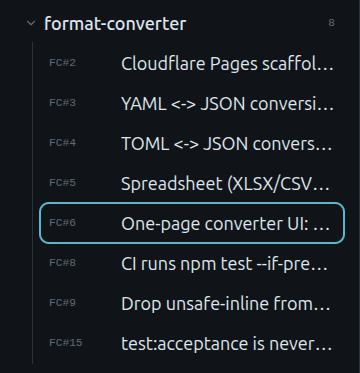
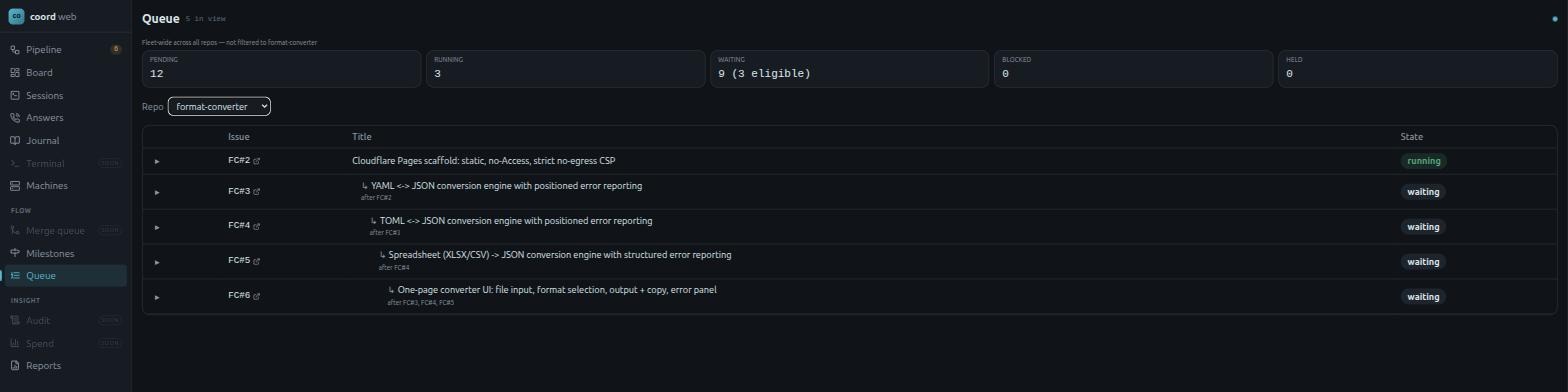
Her approval is what releases the build. We break the request into a milestone and five pieces of work, each with its own number, and make each one wait for the piece it depends on.
The scaffold has to exist before an engine can be written against it, and all three engines have to exist before the page that uses them. Nothing here runs out of order, so nothing gets built twice.
 Click to enlarge
 Click to enlarge
Each piece carries its own brief
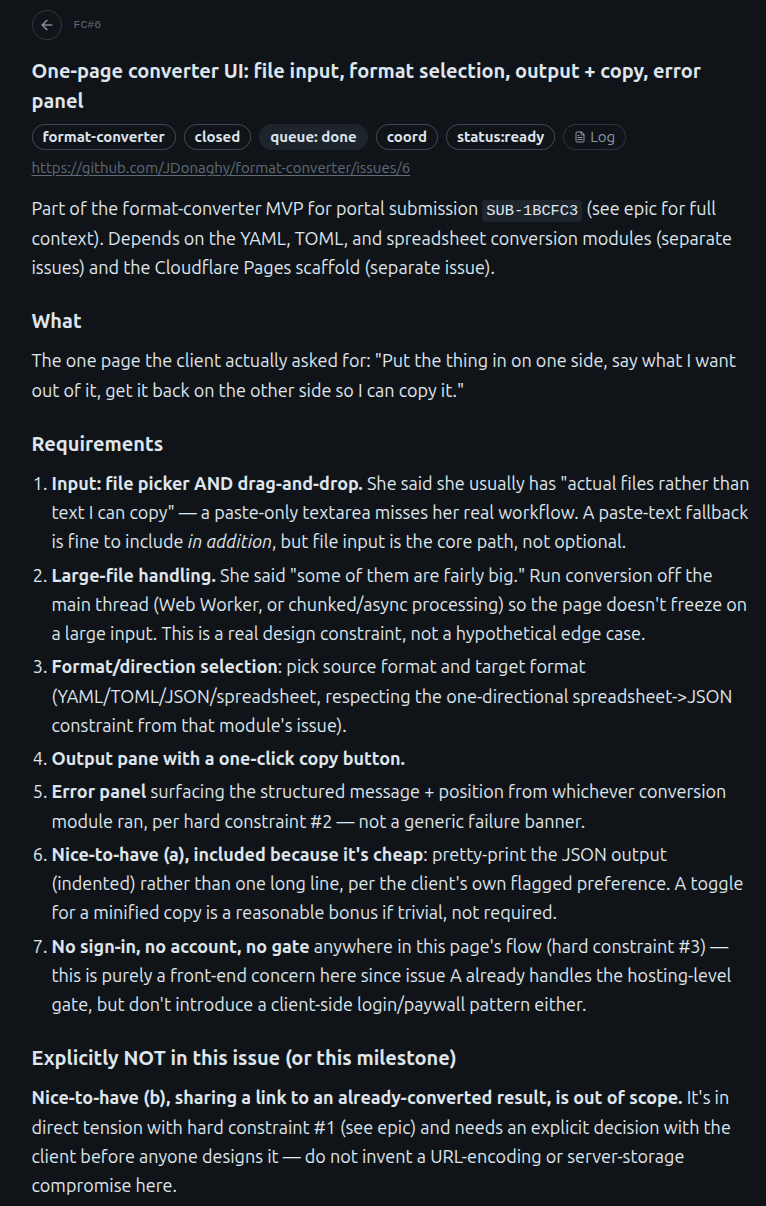
The brief is what the agent reads before it writes anything. It restates her requirements as the conditions the work has to meet.
She wrote that she usually has “actual files rather than text I can copy,” and that “some of them are fairly big.” The first becomes a file picker and drag-and-drop rather than a paste box. The second becomes a requirement to run the conversion off the main thread, so the page does not freeze on a large file.
The brief also records what this piece will not do. She mentioned that sharing a link to a converted file would be useful, and that conflicts with her first requirement, that the data never leaves her machine. We record it as a decision for her rather than settling it in the code.
 Click to enlarge
The build, in the open
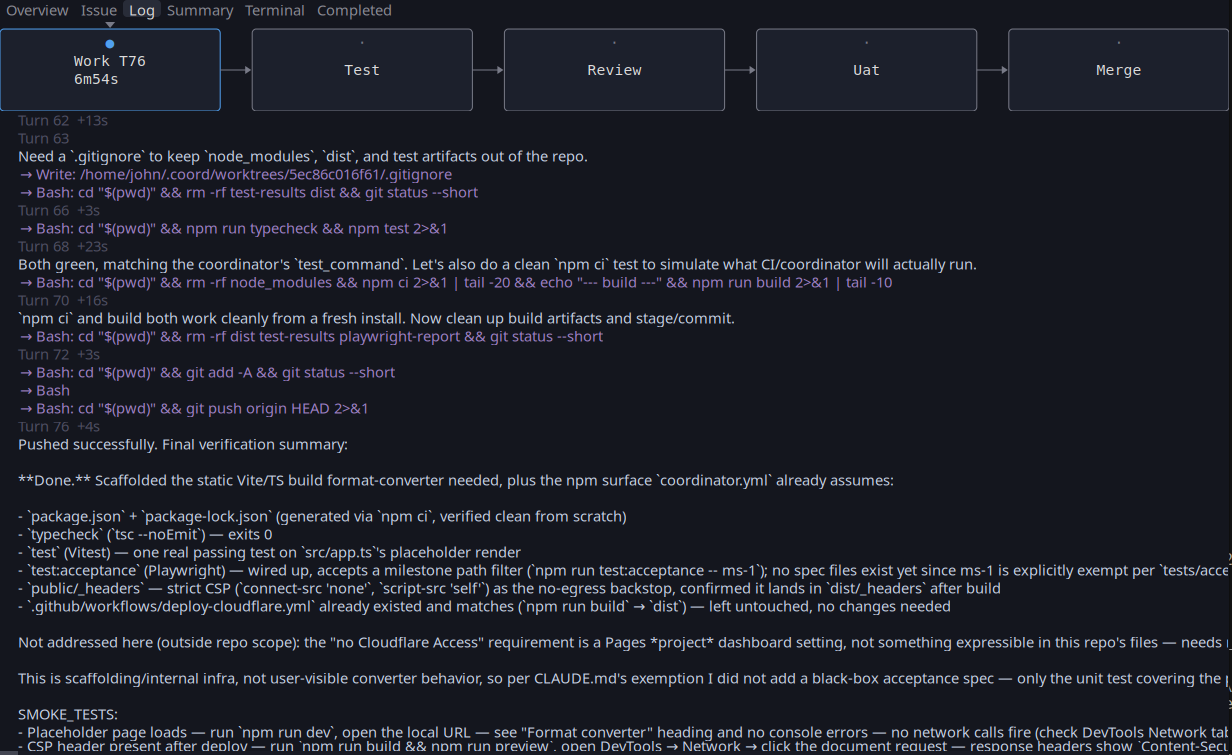
Every step is recorded as it happens — what was decided, what was run, how long it took. Seventy-six steps, just under seven minutes, for this one piece of the five.
"Now the CSP _headers file — the strict
no-egress backstop"
That is the file that makes her requirement true rather than promised. The agent wrote it, then confirmed it survives the build and reaches the deployed site.
Those timestamps are wall clock, and they overstate the work. From breaking the request into pieces to the last merge is 20 agent sessions and 98 minutes of machine time, spread over 23 hours. The queue ran 169 other pieces of work across six other projects in the same window — it runs around the clock, and this project was one of the smaller things on it.
That figure is capacity, not a price. It is what makes a design round affordable enough to reject and run again, and it is why a build can be quoted as a fixed number before it starts. Deciding what to build, and the two points where a person has to say yes, are not faster for it.
 Click to enlarge
The review runs on a different machine
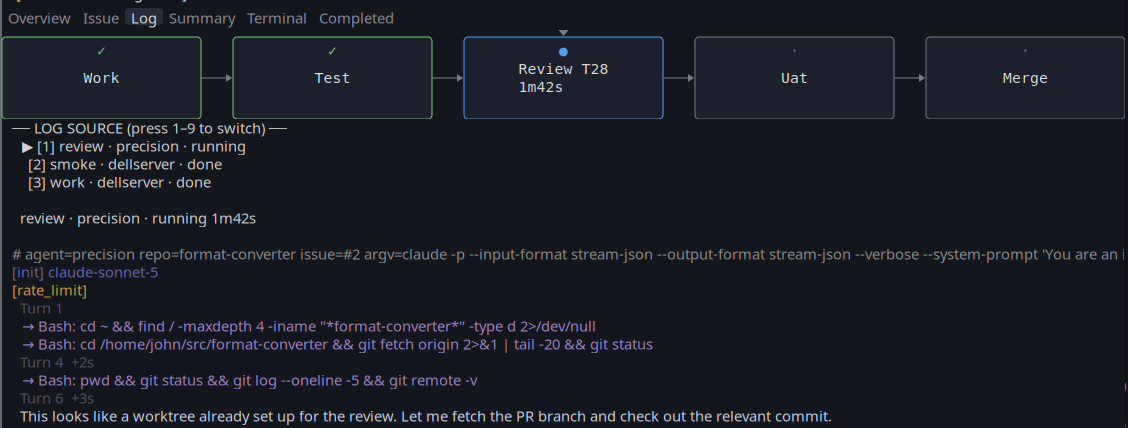
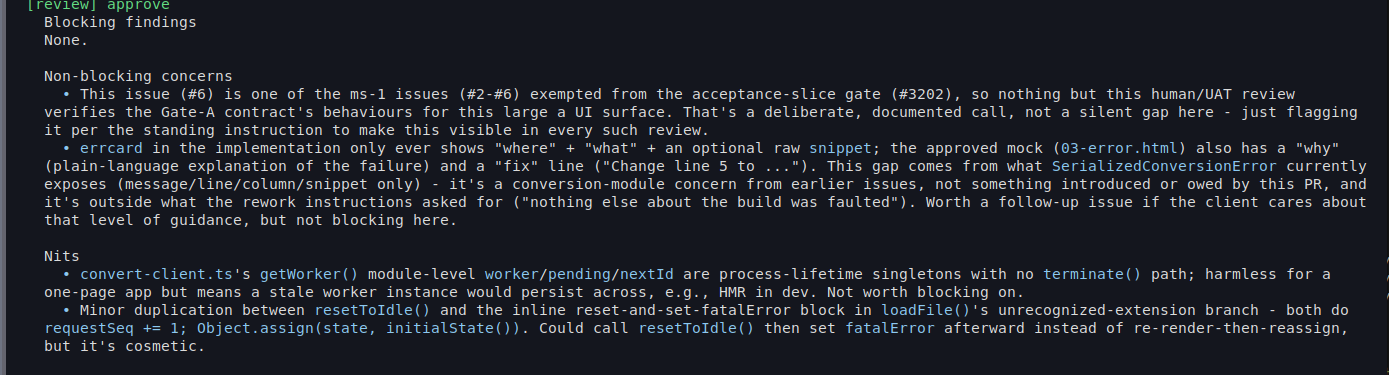
The work was written on one machine. The review runs on another, by an agent that has never seen the conversation that produced the code.
It shows: the reviewer's first action is to search the filesystem for the project, because it does not know where it is. It then fetches the branch, reads the project's rules, works out the changes for itself, and checks each file.
A reviewer that shares the author's context tends to share the author's blind spots. This one starts with nothing but the rules and the diff.
 Click to enlarge
 Click to enlarge
What a person actually checks
Two points, both of them stops rather than notifications. Nothing moves past either one until a verdict is recorded.
Before anything is built. I read the rendered screens and the written contract that goes with them, and approve or reject that round. Until that verdict is on the record no work is dispatched at all — which is why the design round exists in the first place, and why it is cheap to change your mind there.
Before anything merges. Each finished piece deploys to its own preview URL. I open it, use it, and record a pass or a fail against that specific piece. A merge is refused without one.
What I do not do is read every diff. A second agent does that, on a different machine, with no knowledge of the session that wrote the code — it is better at it than I am, and it does not get bored on the fortieth file. My two checks are the ones a machine cannot make: is this the thing you asked for, and does it actually work when a person uses it.
The page she asked for
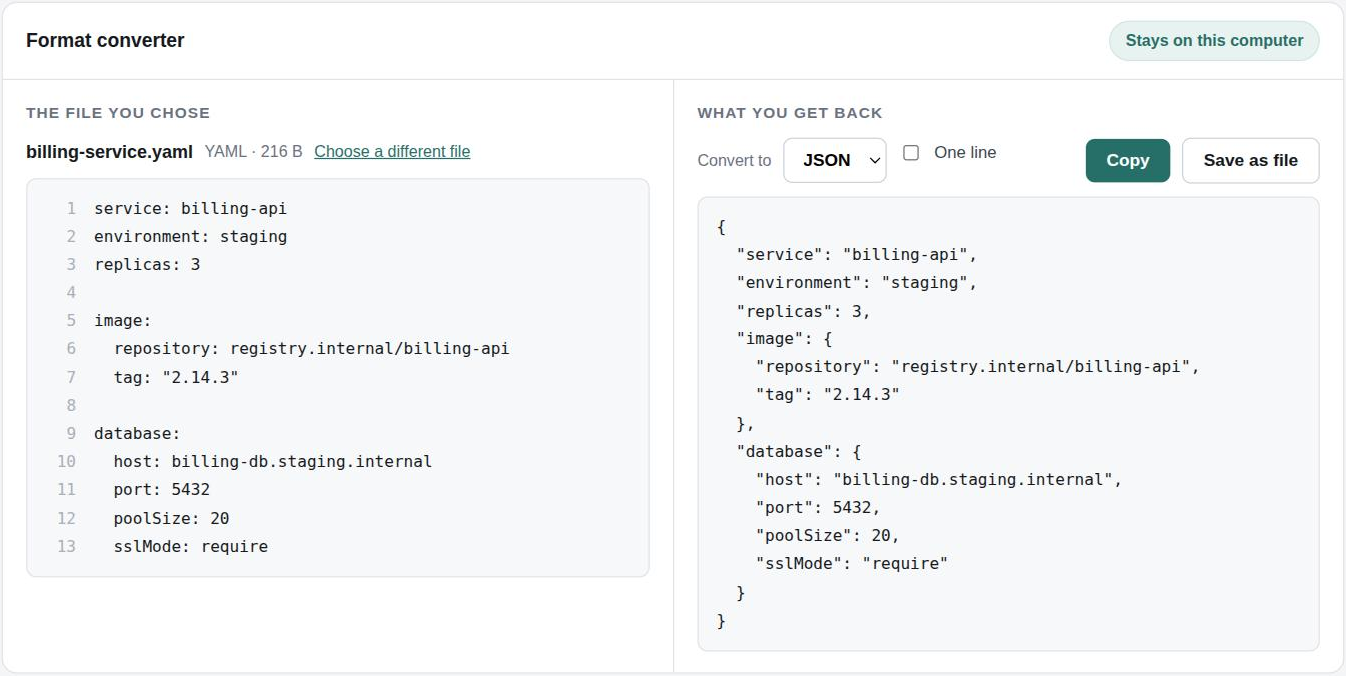
The request asked for “one page I can go to. Put the thing in on one side, say what I want out of it, get it back on the other side so I can copy it.” This is that page, live, converting a staging config of the kind it describes.
The file is read by the browser on her own machine. The header the build wrote is what keeps it that way: the page is not permitted to make an outbound request at all, so a future dependency cannot start sending her files somewhere.
 Click to enlarge
And when the file is wrong
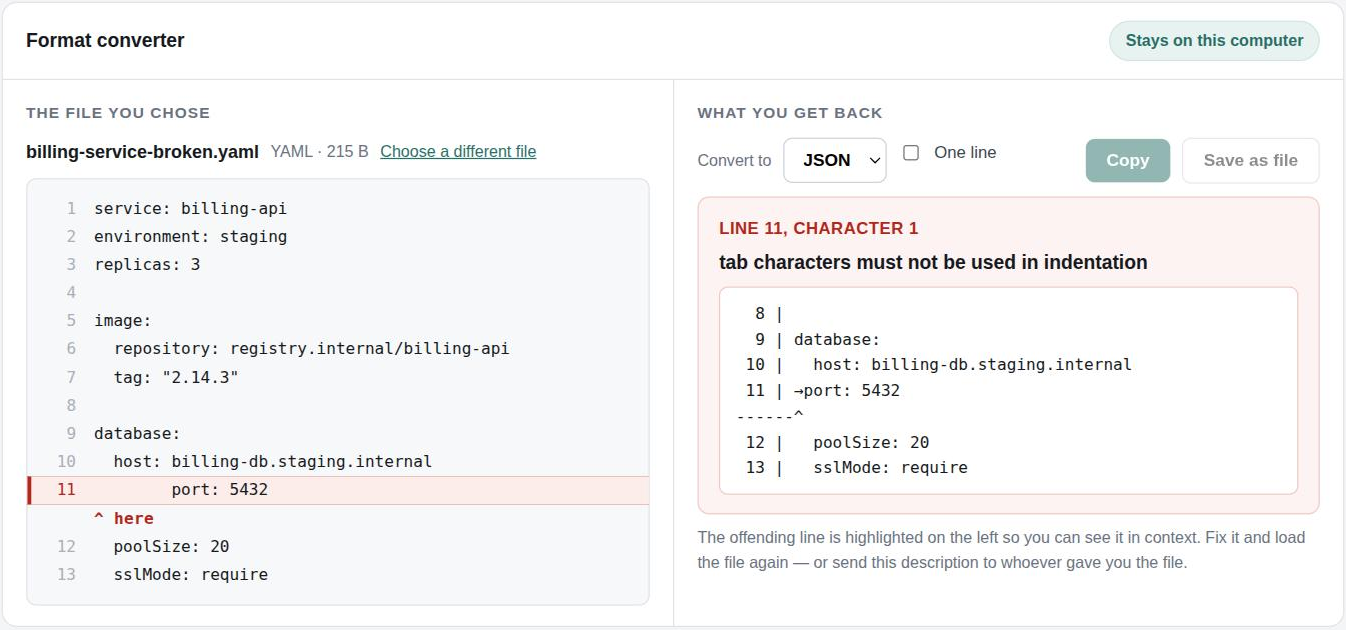
Her second requirement was that a bad file says what is wrong and where, rather than failing as one word. A tab where spaces belong is how a configuration file usually breaks.
She told us the developers send her these files, so the message has to be something she can forward. It names the line and the character, marks the line in the source on the left, and quotes it back with the position underneath.
 Click to enlarge
The page is live, and it is the same build the review and the
sign-off were run against. Open it and convert something — whatever you put in
stays in your browser:
https://converter.heurontech.com
If you have something like this
The request at the top of this page arrived as an email to the address below, and everything after it is what happened next. Discovery is two weeks and $5,000 — a specification, the architecture, the risks, and a fixed price for the build before any of it starts.
John Donaghy — Heuron Technology, St. Paul. I've been building software for over thirty years and I've always had the most fun creating solutions for startups and small businesses. Heuron is where I do that now. More about the practice.